Release notes 2023
This page contains release notes that apply to all APIs on the Base platform for the 2023 versions.
2023r11
Activate individual business APIs
Previously, when the Business API module was activated, all business APIs were available to use, even the ones that were not needed.
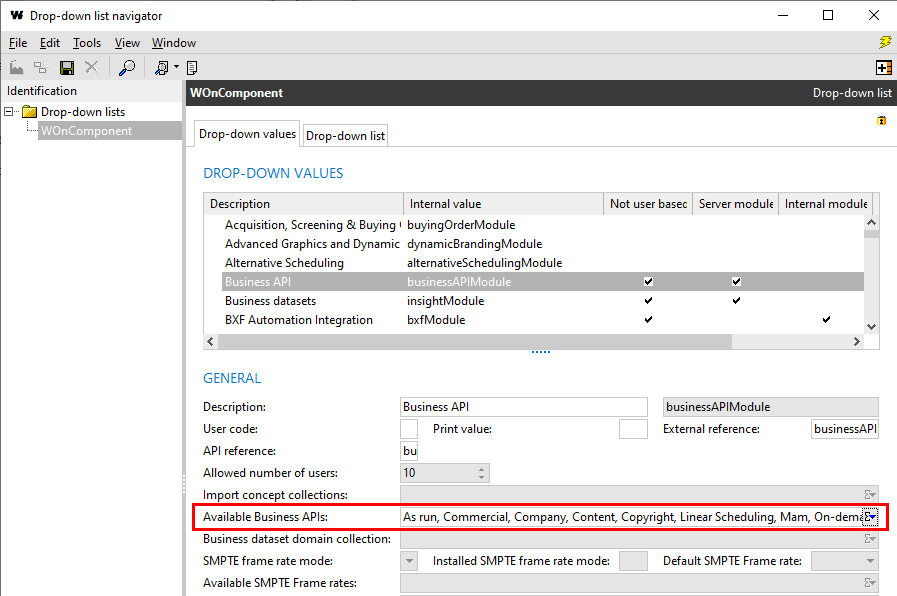
From this version, the Available Business APIs field has been added to the WOnComponent drop-down list.
It can only be edited in configuration mode when the Business API value is selected. Only the needed APIs should be added here. Contact MEDIAGENIX to do this for you.
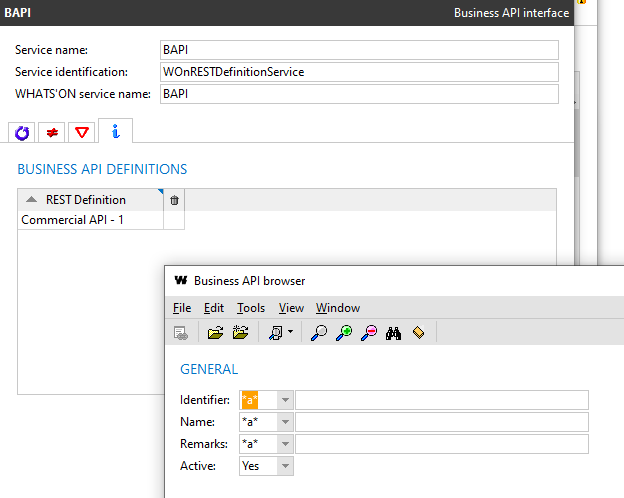
When adding business APIs to the business API interface service, the Active criterion on the browser is now set to Yes to filter out the BAPIs not part of the Available Business APIs field. The inactive APIs are indicated in the result list with a trash can icon.
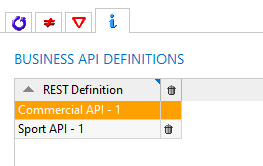
If any APIs were already part of the service, and then deactivated via the drop-down list, they will be marked as inactive in the list and ignored when the service is started.
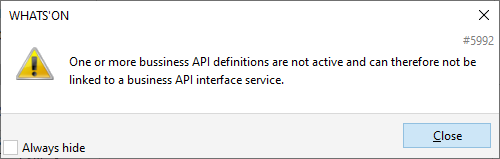
When the user tries to add an API that is not active, message 5992 is shown.
2023r10
Fix for incorrectly parsed login call in BAPIs
Login calls are used to authenticate a user when sending calls to the business APIs. They will contain the username and password of the user in the body. When the body is entered incorrectly but in JSON format and sent, for example:
{dsdqs
  "username": "user",
  "password": "won"
}
then the following error response would sent:
{
    "statusCode": "400",
    "message": "The specified JSON is not syntactically valid",
    "timestamp": "2023-10-04T13:37:43Z",
    "errors": [
        {
            "errorCode": "REST-400",
            "description": "The specified JSON is not syntactically valid",
            "data": []
        }
    ]
}
However, when you would enter a body not in JSON format, for example,
--"username": "user",
--"password": "won"
then the BAPI service would crash and the credentials were visible in the crash report.
This issue has been fixed. From now, in this case, the same error message is returned:
{
    "statusCode": "400",
    "message": "The specified JSON is not syntactically valid",
    "timestamp": "2023-10-04T13:45:11Z",
    "errors": [
        {
            "errorCode": "REST-400",
            "description": "The specified JSON is not syntactically valid",
            "data": []
        }
    ]
}
2023r8
Fix for content-type header of login call from REST services
It is possible to authenticate calls from REST services to external systems using JWT.
Previously, when a login call was sent from a REST service in WHATS'ON (for example when pushing change log entries), the Content-type header was set to application/plaintext while the format of the body was in JSON.
This issue has been fixed. The Content-type header is now set to application/json.
Fix for error response code for expired JWT
In a previous version, authentication using JWT was implemented using the JWT standard.
Previously, when the JWT was expired, error response code 403 was returned.
{
    "statusCode": "403",
    "message": "The account being accessed does not have sufficient permissions to execute this operation. [Additional info]",
    "timestamp": "2022-08-19T12:27:48Z"
}
However, according to the standard, error code 401 should be returned.
{
    "statusCode": "401",
    "message": "The access token expired",
    "timestamp": "2022-08-19T12:27:48Z"
}
This issue has been fixed. When the token is expired, a 401 error will be returned.