Authentication
Approach
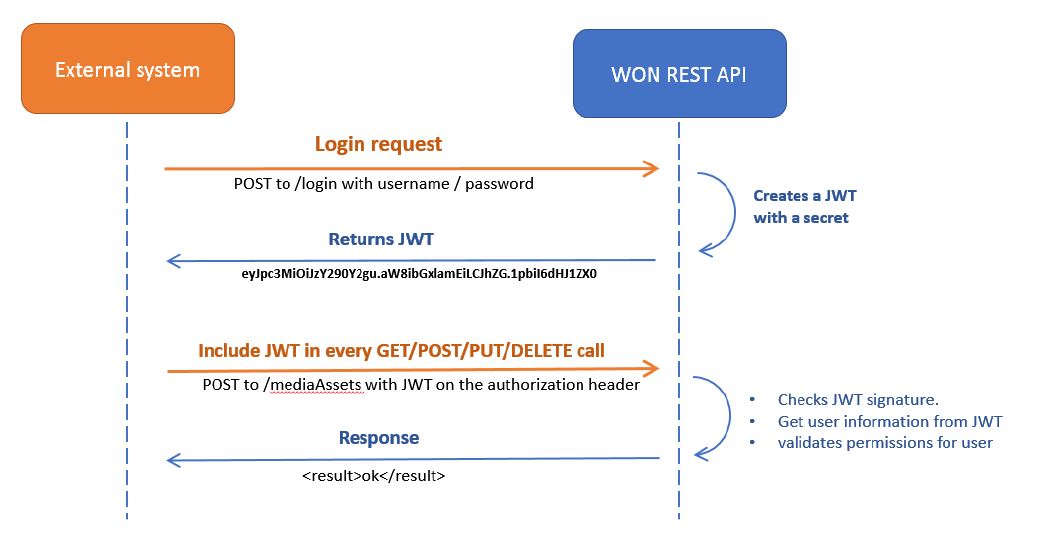
It is possible to restrict access to the API with JSON Web tokens (JWT). The general approach with using JWT as authentication method is as follows:
- A JWT is requested by submitting credentials to the API.
- In case the credentials are valid, a JWT is generated by WHATS'ON.
- The JWT is returned to the client.
- For each request, the JWT must be included in the header.
- WHATS'ON reads the JWT for every request and validates it before processing the message.
- A response message is returned.
Configuration
Service settings
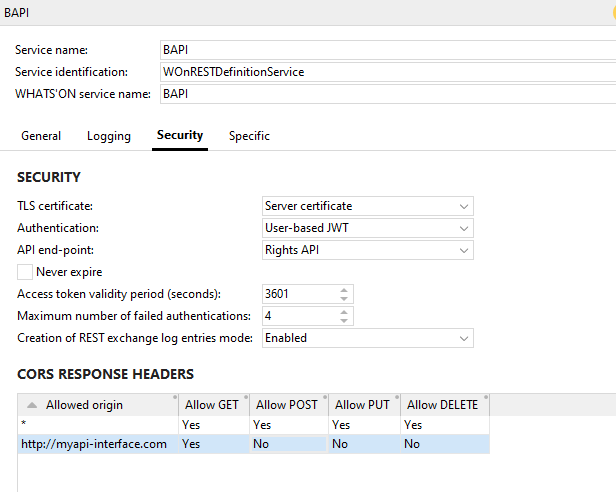
In the service settings, it is possible to indicate the authentication level. Options are:
- No Authentication
- User based JWT
When the User based JWT authentication method is used, the user must have access to the API and have a token.
Additionally, it is possible to set the validity period for the token or to set it to Never expire.
An API endpoint can also be defined when User based JWT is selected. If this is not defined, an API user could be used to access any REST API if they have the appropriate permissions. The field can be used to specify the endpoint needed for this service. On the user account, the drop-down Allowed API endpoints is available, where it can be used to specify which endpoints the user has access to. It is only enabled when the Access type is set to API or UI and API. When a user authenticates to a REST API service by sending a login call, the token is returned. When it is decoded, the aud claim will contain the user codes of the API endpoints of the user. When the user sends a call with the token to the API, the API endpoints of the service and user are compared. If the service has no end points defined, those of the user do not need to be checked. If it does, it will be checked if the API endpoint of the service matches any of the endpoints on the user account. If not, a 403 response is returned.
A Maximum number of failed authentications can also be defined. When a user of access type API fails to log in more than the number of times set in this field, and email notifications are configured, an email will be sent to the email addressee to notify that maximum authentication tries was exceeded. The log of the service will then include a reference to the user and the IP address from which the logging in was attempted. This allows security officers to block this IP in the firewall.
Permission navigator
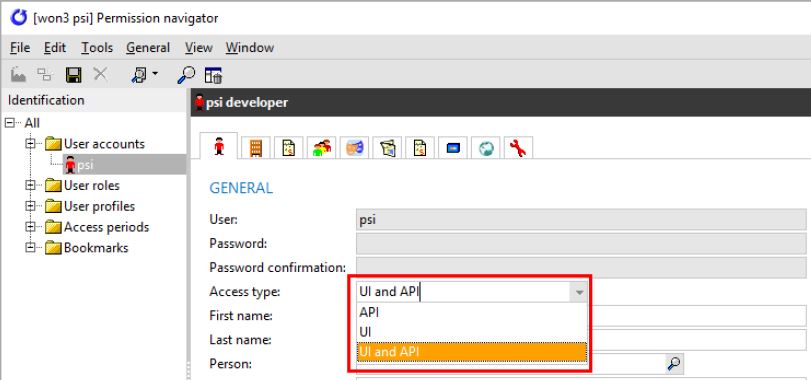
In the permission navigator, it is possible to set the access level of the user in the field Access type:
-
API: only allows the user to access the REST API, i.e. the user cannot log into WHATS'ON but can execute calls towards the REST API services.
-
UI: only allows the user to access the user interface of WHATS'ON, i.e. the user can log into WHATS'ON but cannot send calls towards the REST API services.
-
UI and API: there are no restrictions for this user. The user can access the user interface and the REST API of WHATS'ON.
API user account permissions
Additionally, when a user logs in with a username and password, the permissions as they are set on the role of that user in WHATS’ON are honoured. Generally, the user needs the permissions that would be needed to edit the concept of the API in WHATS'ON.
For example, when the user does not have the Program Creation Management permission and they send a POST call to create a product, the following response is sent back to inform about the permissions:
{
  "statusCode": "403",
  "message": "The account being accessed does not have sufficient permissions to execute this operation.",
  "timestamp": "2021-07-06T09:23:56Z"
}
See the pages for each API to know which functionalities are needed.
Requesting a token
To request a token, a POST call must be sent to the to the /login path of the API. The body of this call needs to contain the credentials of the user accessing the API in the following format:
POST /login

{
    "username": "api-user",
    "password": "won1"
}
All calls should be sent over HTTPS to ensure that usernames and passwords are not sent unencrypted! See Setting up HTTPS for details on how to configure HTTPS communication.
The response of the login call contains following information:
-
statusCode: the status code is 0 in case of successful authentication. -
message: a response message which contains the description in case of errors. -
token: the access token to be sent as part of the header for any calls to the API. -
service: name of the service to which the user is authorized.
{
    "statusCode": "0",
    "message": "Authentication successful",
    "token": "eyJhbGciOiJIUzI1NiIsInR5cCI6IkpXVCJ9.eyJ1c2VybmFtZSI6InBzaSIsInBhc3N3b3JkIjpudWxsLCJpYXQiOjE1MDc3NDk1MDN9.SWUKmXP1P4uTu323QFmhBwnuP9eBDPJqKZa2jWiXk7c",
    "service": "Rights Business API"
}
Authentication
Once a token is requested, the token must be included in the authorization header of every REST call using the following format:
Authorization: Bearer <token>
The header in an actual request would look as follows:
Authorization: Bearer eyJhbGciOiJIUzI1NiIsInR5cCI6IkpXVCJ9.
eyJ1c2VybmFtZSI6InBzaSIsInBhc3N3b3JkIjpudWxsLCJpYXQiOjE1MDc3NDk1MDN9.SWUKmXP1P4uTu323QFmhBwnuP9eBDPJqKZa2jWiXk7c
The same token can be re-used as long as it has not expired yet.
In case any problems occur with the authentication, the following status codes can be returned:
| Status code | Description |
|---|---|
| 401 Unauthorized |
This response is returned in the following cases:
|
|
403 Forbidden |
This response is returned in the following cases:
|