Release notes
2024r4
Retrieve time allocations of transmission and broadcast day in linear schedule API
In version 2022r4, calls were added to retrieve the transmission events of a broadcast day or transmission (RN-4929). From this version, the same has been done for time allocations.
GET /timeAllocations
This call retrieves all time allocations of all transmissions on a certain broadcast day. The following search parameters can be used in the request URL but are not mandatory:
-
date: in format YYYY-MM-DD -
channel: the API reference of the Channel drop-down value.Only linear channels are accepted. For other channels, nothing will be returned.
-
scheduleVersion: the API reference of the PSIScheduleVersion drop-down value -
type: the API reference of the BMTimeAllocationType drop-down value
Note that if none are included, all time allocations of linear transmissions are returned. The parameters must be configured with the necessary operators.
An example of the URL: /timeAllocations?filter=eq(date,2024-01-28);eq(channel,MGX);eq(scheduleVersion,Active);eq(type,programSegment)
In the response, an array is returned of all time allocations matching the search with the following attributes:
[
    {
        "startTime": "06:30:00",
        "title": "ALITA: BATTLE ANGEL - 1/2",
        "duration": "01:00:00",
        "filledDuration": "01:00:00",
        "sellOutDuration": "01:00:00"
    },
    {
        "startTime": "07:30:00",
        "title": "ALITA: BATTLE ANGEL - 2/2",
        "duration": "01:03:00",
        "filledDuration": "01:03:00",
        "sellOutDuration": "01:03:00"
    },
]
GET /transmissions/{transmissionId}/timeAllocations
This call retrieves all time allocations of a specific transmission. This means the transmissionId is a required parameter in the request URL. Only the ID of linear transmissions will be accepted. If the external reference of an on-demand, publication or encoding transmission is provided, an error message is returned.
In the response, an array is returned of all time allocations in the transmission. For example:
[
    {
        "startTime": "12:22:00",
        "title": "The Dead Don't Die -  - Commercial",
        "duration": "00:03:00",
        "filledDuration": "00:03:00",
        "sellOutDuration": "00:03:00"
    },
    {
        "startTime": "12:25:00",
        "title": "The Dead Don't Die - 1/2",
        "duration": "00:50:00",
        "filledDuration": "00:50:00",
        "sellOutDuration": "00:50:00"
    },
...
]
The YAML has been updated for these changes. The latest version can be retrieved by using the GET /api call.
API developers
The following was changed in the YAML.
At line 276, the /timeAllocations and /transmissions/{transmissionId}/timeAllocations paths were added.
At line 860, the TimeAllocation schema was added.
At line 959, the ArrayOfTimeAllocations schema was added.
At line 1089, the TimeAllocationSuccess schema was added.
For easier viewing, the YAMLs can also be compared here: https://www.textcompare.org/yaml
2023r10
Fix for transmission durations longer than 99:99:99 in linear schedule API
Previously, when using the linear schedule API and a POST /transmissions call would be sent with the following body including a duration higher than 99:99:99,
{
  "title": "Film",
  "transmissionId": "1234567",
  "channel": "MGX",
  "startDate": "2024-05-12",
  "startTime": "14:00",
  "duration": "100:99:99",
  "announcedTime": "14:00"
}
the following error response would be shown:
{
    "statusCode": "422",
    "message": "Operation cannot be completed due to violations",
    "timestamp": "2023-05-10T09:45:35Z",
    "concept": "Transmission",
    "id": "1234567",
    "errors": [
        {
            "errorCode": "CORE-00002",
            "description": "Parsing error. Use format:[hh]:[mm], [hh]:[mm]:[ss]",
            "data": [
                "100:99:99"
            ]
        }
    ]
}
However, when you would enter this number in the transmission plan, it would be accepted and converted to the correct hours, minutes and seconds, for example 101:40:39.
This issue has been fixed. When a body with a duration higher than 99:99:99 is sent now, the duration is accepted and also converted correctly.
2023r3
Fix for HH:MM:SS format in POST /fullDays call of linear schedule API
Since the previous version, it is possible to use both HH:MM and the HH:MM:SS formats for the startTime and announcedTime attributes in the PUT /transmissions and POST /transmissions and /fullDays calls of the linear schedule API.
However, when using the HH:MM:SS format in the POST /fullDays call, the old error response would still be returned:
{
    "statusCode": "422",
    "message": "Operation cannot be completed due to violations",
    "timestamp": "2023-02-22T13:57:32Z",
    "concept": "Transmission",
    "id": "5655715812",
    "errors": [
        {
            "errorCode": "CORE-00002",
            "description": "Parsing error. Use format:[hh]:[mm]",
            "data": [
                "10:00:20"
            ]
        }
    ]
}
This issue has been fixed. The HH:MM:SS format is now also accepted in this call.
2023r2
-
Start time and announced time in HH:MM:SS format in linear schedule API
-
Fix for head title in GET /transmissions call of linear schedule API
-
Fix for incorrect body of POST /fullDays call in linear schedule API
Live in POST /fullDays call of linear schedule API
Previously, in the linear schedule API, the live attribute was already available in the GET, PUT, POST /transmissions call.
From this version, it can also be added to the POST /fullDays call.
It maps to the Should be live check box on a transmission.
{
  "channel": "MGX",
  "scheduleVersion": "Active",
  "date": "2023-02-22",
  "transmissions": [
    {
      "template": "TX",
      "title": "NEWS",
      "transmissionId": "123456789",
      "startTime": "19:00",
      "duration": "60:00",
      "announcedTime": "19:00",
      "productCode": "NEWS1",
      "contentId": "987654321",
      "live": "true",
      "publicationRecord": {
...
A new version of the YAML should be retrieved to use the new attribute. This can be done via the GET /api call.
Start time and announced time in HH:MM:SS format in linear schedule API
Previously, the startTime and announcedTime attributes in the linear schedule API only supported times entered in the HH:MM format. These attributes could be used in the GET, PUT and POST /transmissions calls and POST /fullDays call.
If another format was used, such as HH:MM:SS, then the following error code was returned:
{
    "statusCode": "422",
    "message": "Operation cannot be completed due to violations",
    "timestamp": "2023-02-22T13:57:32Z",
    "concept": "Transmission",
    "id": "5655715812",
    "errors": [
        {
            "errorCode": "CORE-00002",
            "description": "Parsing error. Use format:[hh]:[mm]",
            "data": [
                "10:00:20"
            ]
        }
    ]
}
From this version, it is possible to use both HH:MM and the HH:MM:SS formats.
In the PUT /transmissions and POST /transmissions and /fullDays calls, the startTime and announcedTime attributes will accept either format.
{
    "title": "FFG 2020 - Kajillionaire",
    "transmissionId": "5655715812",
    "channel": "MgX",
    "scheduleVersion": "Active",
    "template": "Tx",
    "startDate": "2024-07-20",
    "startTime": "10:00:20",
    "duration": "01:00:00",
    "announcedTime": "10:00"
}
If the format HH:MM is used, then the seconds will default to 0.
For example, "startTime": "10:00" will be translated to 10:00:00 in HH:MM:SS format.
In the GET /transmission and /transmissions?filter calls, the startTimeWithSeconds and announcedTimeWithSeconds attributes have been added to the response.
They will show the start time and announced time in the HH:MM:SS format while the existing startTime and announcedTime attributes will show them in the HH:MM format.
{
    "title": "FFG 2020 - Kajillionaire",
    "transmissionId": "5655715812",
    "channel": "MgX",
    "scheduleVersion": "Active",
    "template": "Tx",
    "startDate": "2024-07-20",
    "startTime": "10:00",
    "startTimeWithSeconds": "10:00:20",
    "duration": "01:00:00",
    "announcedTime": "10:00",
    "announcedTimeWithSeconds": "10:00:00",
    "contentId": "3611445527"
}
A new version of the YAML should be retrieved to use the new attributes. This can be done via the GET /api call.
Check on frame rate transitions in linear schedule API
Since the previous version, it has been possible to define frame rate transitions on linear channels. (RN-5387) A frame rate transition indicates from what date the channel will work with another frame rate.
In the POST /transmissions and /fullDay and PUT /transmissions calls of the linear schedule API, the template attribute can be used to create transmissions using a transmission prototype.
Previously, whether or not the Transmission frame rate of the prototype matched the frame rate of the channel was already checked. (RN-5092) When a template was specified with a different frame rate, the following error code would be returned:
{
    "statusCode": "422",
    ...
    "errors": [
        {
            "errorCode": "LINEARSCHEDULE-00011",
            "description": "Transmission prototype: Tx is not valid for channel: MgX",
            "data": [
                "Tx",
                "MgX"
            ]
        }
    ]
}
Now, with the frame rate transitions, one channel can have different frame rates depending on the broadcast day.
Therefore, from this version, the frame rate of the transmission prototype provided in the call is checked against the frame rate that is applicable for the broadcast date, based on the frame rate transition.
For example, the frame rate of the channel is 25FPS but from 01/03/2023, a frame rate transition exists to switch to 50FPS as the planning frame rate. When I create a transmission on 28/02, the frame rate of the prototype should be 25FPS. When I create one on 01/03, the frame rate of the prototype should be 50FPS.
When the frame rates of the prototype and date match, the transmission is created. When they do not, an error code is returned with the prototype, frame rate and broadcast date.
For example, with the settings from the example above, I create a transmission with a prototype of 25FPS. This is allowed on 24/02 but when I create it on 03/03, it is not valid. The following error is returned
{
    "statusCode": "422",
    "message": "Operation cannot be completed due to violations",
    "timestamp": "2023-02-23T10:23:14Z",
    "concept": "Transmission",
    "id": "TxBAPI",
    "errors": [
        {
            "errorCode": "LINEARSCHEDULE-00032",
            "description": "Frame rate: 25fps on transmission prototype: TxFR is not valid on date: 3 March 2023 for channel: MgX",
            "data": [
                "25fps",
                "TxFR",
                "3 March 2023",
                "MgX"
            ]
        }
    ]
}
When a POST or PUT call is sent to move a transmission to a date with a different frame rate, the same error message is returned.
For example, I created a transmission with a prototype of 25FPS on 24/02. The frame rates switches to 50FPS on 01/05. When I send a PUT call to move the transmission to 05/05, the frame rate is not valid so an error code is shown and the transmission is not moved.
Fix for head title in GET /transmissions call of linear schedule API
In a previous version, a fix was done in the GET /transmissions/:transmissionId: call to return the head title of a transmission for the title attribute.
However, in the GET /transmissions (search) call, the title attribute still returned the Title of a transmission.
This issue has been fixed. In this call, the head title is also returned.
Fix for incorrect body of POST /fullDays call in linear schedule API
Previously, when using the linear schedule API, the service would crash when sending a POST /fullDays call with the following body:
[
    {
    "title": "FFG 2020 - Kajillionaire",
    "transmissionId": "5655715812",
    "channel": "MgX",
    "scheduleVersion": "Active",
    "template": "Tx",
    "startDate": "2024-07-20",
    "startTime": "10:00",
    "duration": "01:00:00",
    "announcedTime": "10:00",
    "contentId": "3611445527"
    }
]
The crash happened because the body was not configured correctly as a JSON body.
This issue has been fixed. When an incorrect body is sent, the following error is returned:
{
    "statusCode": "422",
    "message": "Operation cannot be completed due to violations",
    "timestamp": "2023-02-23T11:16:17Z",
    "concept": "Full day import",
    "id": null,
    "errors": [
        {
            "errorCode": "LINEARSCHEDULE-00033",
            "description": "The JSON body must be a JSON object",
            "data": []
        }
    ]
}
2022r9
Fix for publication record set to null in linear schedule API
In a previous version, a fix was done for when a null value was sent for the publicationRecord attribute on POST or PUT /fullDays call of the linear schedule API. (See version 2022r7)
However, a crash still occurred when using it for the POST or PUT /transmissions calls.
This issue has also been fixed. With the new version of the YAML, the following response will also be returned:
[
    {
        "statusCode": "422",
        "message": "Operation cannot be completed due to violations",
        "timestamp": "2022-11-15T13:14:22Z",
        "concept": "Transmission",
        "id": "8067318812",
        "errors": [
            {
                "errorCode": "LINEARSCHEDULE-00031",
                "description": "Publication record should be an object",
                "data": []
            }
        ]
    }
]
Fix for title in GET /transmission call of linear schedule API
Previously, when executing a GET /transmissions/:transmissionId: call, the title attribute returned the Title of a transmission, which is not the most useful title.
{
     "title": "Friday blockbuster",
     "transmissionId": "6584019812",
     "channel": "MgX",
     ...
}
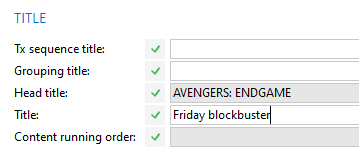
This issue has been fixed. The title attribute now returns the head title.
{
    "title": "AVENGERS: ENDGAME",
    "transmissionId": "6584019812",
    "channel": "MgX",
    ...
}
Note that in the POST and PUT calls, the title still corresponds to the Title field as the head title cannot be edited.
2022r8
Fix for empty contentId in POST /fullDays call of linear schedule API
Previously, when you would send a POST /fullDays call with an empty contentID, the BAPI service would crash.
This issue has been fixed. It is now possible to create transmissions without content linked.
2022r7
Transmission parental rating in GET /transmission call of linear schedule API
Previously, in the linear schedule API, the parental rating of a transmission could only be consulted on its publication record.
From this version, the transmissionParentalRating attribute has been added to the transmission attributes in the response of the GET/transmissions/{transmissionId} call:
{
    "title": null,
    "transmissionId": "7520133812",
    "channel": "MgX",
    "scheduleVersion": "Active",
    "template": null,
    ...
    "live": false,
    "transmissionParentalRating": "6",
    "publicationRecord": null,
    "contractId": null,
    "contractNumber": null,
    ...
}
Fixes for POST /fullDays call with publication record in linear schedule API
When you create transmissions on linear channels without a linear publication system, the transmissions created on that channel will also not have a publication system. When you later do define a system on the channel and choose not to update the existing transmissions, they will remain without a publication system.
Previously, when you would send a POST /fullDays call to update such a transmission with the following body, then the system would crash.
{
  "channel": "Regional",
  "scheduleVersion": "Active",
  "date": "2022-09-08",
  "transmissions": [
    {
      "title": "Avengers",
      "transmissionId": "8378517812",
      "startTime": "14:00",
      "duration": "02:00:00",
      "announcedTime": "14:00",
      "contentId": "3261554527",
      "publicationRecord": {
        "translatedTitle": "string",
        "episodeTitle": "string",
        "episodeNumber": 0,
        "seriesTitle": "string",
        "translatedEpisodeTitle": "string"
      }
    }
  ]
}
This was because the call included attributes to create or update a publication record, which cannot be done without a publication system.
Similarly, whenever you would have the following in your call, the system would crash: "publicationRecord": null
This is because a publication record is a separate object which cannot be left as null.
These issues have been fixed.
From this version, the following response is shown in the first scenario:
[
    {
        "statusCode": "422",
        "message": "Operation cannot be completed due to violations",
        "timestamp": "2022-11-15T14:06:56Z",
        "concept": "Transmission",
        "id": "8067318812",
        "errors": [
            {
                "errorCode": "LINEARSCHEDULE-00025",
                "description": "For transmission I Used to Be Normal no program guide record can be created.
                                Please, provide a press publication system for the transmission ",
                "data": [
                    "I Used to Be Normal"
                ]
            }
        ]
    }
]
The following response is shown for the second scenario:
[
    {
        "statusCode": "422",
        "message": "Operation cannot be completed due to violations",
        "timestamp": "2022-11-15T13:14:22Z",
        "concept": "Transmission",
        "id": "8067318812",
        "errors": [
            {
                "errorCode": "LINEARSCHEDULE-00031",
                "description": "Publication record should be an object",
                "data": []
            }
        ]
    }
]
Fix for overwriting transmissions with POST /fullDays in linear schedule API
Previously, when you had a certain broadcast day with a regular transmission and a split transmission, and you would send a POST /fullDays call with the overwrite parameter set to true, the system would crash because with the overwrite parameter, all transmissions would be deleted but it could not delete the split transmission.
This issue has been fixed. From now on, in this scenario, the following error is returned:
{
    "statusCode": "422",
    "message": "Operation cannot be completed due to violations",
    "timestamp": "2022-07-04T09:41:14Z",
    "concept": "Full day import",
    "id": null,
    "errors": [
        {
            "errorCode": "LINEARSCHEDULE-00022",
            "description": "This day contains transmissions that can not be deleted",
            "data": []
        }
    ]
}
2022r4
Retrieve transmission events of transmission and broadcast day with linear schedule API
It was already possible to retrieve and work with transmissions in the linear schedule API.
From this version, it is also possible to retrieve transmission events using new calls.
Retrieve transmission events of a single transmission
GET /transmissions/:transmissionId:/transmissionEvents
This call retrieves all transmission events of a specific transmission. This means the transmissionId is a required parameter in the request URL. Only the ID of linear transmissions will be accepted.
In the response, an array is returned of all transmission events in the transmission, including program segments.
[
    {
        "reconcileKey": "8652102327",
        "date": "2022-05-04",
        "startTime": "01:00:00.00",
        "duration": "00:30:00.00",
        "timecodeIn": "00:00:00.00",
        "timecodeOut": "00:30:00.00",
        "frameRate": "25fps",
        "title": "THE MANDALORIAN - THE MANDALORIAN 1 - 1/2",
        "contentId": "3934087527",
        "contentType": "episode",
        "interstitialType": null,
        "productCode": null,
        "mediaAssetId": null,
        "mediaAssetLabel": null,
        "videocomponentId": null,
        "mediaLabel": null,
        "timeAllocationType": "programSegment",
        "transmissionId": "8652099812",
        "channelId": "MgX"
    },
    {
        "reconcileKey": "8660952327",
        "date": "2022-05-04",
        "startTime": "01:34:01.00",
        "duration": "00:00:35.00",
        "timecodeIn": "00:00:02.00",
        "timecodeOut": "00:00:37.00",
        "frameRate": "25fps",
        "title": "Coca-Cola",
        "contentId": "1000661414",
        "contentType": "commercialProductType",
        "interstitialType": "Commercial",
        "productCode": "CIM-MgX-003",
        "mediaAssetId": "1504211000",
        "mediaAssetLabel": "0000000048",
        "videocomponentId": "1504221000",
        "mediaLabel": "0000000048",
        "timeAllocationType": "commercial",
        "transmissionId": "8652099812",
        "channelId": "MgX"
    }
]
Most attributes return the external reference of the object, a time or date, but some come from drop-down lists:
| Value for attribute | Is taken from API reference in drop-down list |
|---|---|
contentType
|
PSIProductType |
interstitialType
|
PSITrailerType, WOnCommercialType, WOnMusicClipType |
timeAllocationType
|
BMTimeAllocationType |
channelId
|
Channel |
Retrieve transmission events of a broadcast day
GET /transmissionEvents?filter=eq(channel,:channelID:);eq(date,YYYY-MM-DD)
This call retrieves all transmission events of all transmissions on a certain broadcast day. The date and channel are required search parameters in the request URL. If they are not part of the call, the following response is returned:
{
    "statusCode": "422",
    "message": "The following query parameters are mandatory and were not specified in the request URI: 'channel, date'",
    "timestamp": "2022-05-10T12:20:31Z"
}
Similarly, only linear channels can be used in the query. For others, nothing will be returned. Only the events from the active schedule of the channel will be returned.
The parameters need to be configured with the necessary operators as in the example URL above. For channel, the following can be used: eq, ne, notNull, in. For date: eq, ne, gt, ge, lt , le, notNull, between, in. (SeeSearch for media assets for more information.)
In the response, an array is returned of all transmission events on the day with the following attributes:
{
     "reconcileKey": "8660952327",
     "date": "2022-05-04",
     "startTime": "01:30:30.00",
     "duration": "00:00:35.00",
     "timecodeIn": "00:00:02.00",
     "timecodeOut": "00:00:37.00",
     "frameRate": "25fps",
     "title": "Coca-Cola",
     "contentId": "1000661414",
     "contentType": "commercialProductType",
     "interstitialType": "Commercial",
     "productCode": "CIM-MgX-003",
     "mediaAssetId": "1504211000",
     "mediaAssetLabel": "0000000048",
     "videocomponentId": "1504221000",
     "mediaLabel": "0000000048",
     "timeAllocationType": "commercial",
     "transmissionId": "8652099812",
     "channelId": "MgX"
    }
Most attributes return the external reference of the object, a time or date, but some come from drop-down lists:
| Value for attribute | Is taken from API reference in drop-down list |
|---|---|
contentType
|
PSIProductType |
interstitialType
|
PSITrailerType, WOnCommercialType, WOnMusicClipType |
timeAllocationType
|
BMTimeAllocationType |
channelId
|
Channel |
2022r3
Schedule version in linear schedule API
In a previous version, the linear schedule API always worked with the active schedule.
From this version, alternative schedule versions are also supported. This caused changes to the YAML so it is recommended to execute the call to get the newest version of the YAML.
A GET call was added to retrieve all possible schedule versions of a channel. (GET /channels/:channelId/scheduleVersions)
In the GET call to search for transmissions (GET /transmissions), the scheduleVersion attribute was added as filter and sort parameter.
The scheduleVersion attribute was added to the response body of the GET calls to search for transmissions (GET /transmissions) and search for specific transmissions (GET /transmissions/:transmission Id).
{
    "title": null,
    "transmissionId": "7917843812",
    "channel": "MgX",
    "scheduleVersion": "activeTxSchedule",
    "template": null,
    "startDate": "2022-05-02",
    "startTime": "02:00",
    "duration": "01:00:00"
    ...
}
In the POST call to create or update transmissions (POST /transmissions), the scheduleVersion attribute has been added.
{
  "channel": "MgX",
  "template": "Transmission",
  "title": "Film",
  "transmissionId": "ABBB",
  "scheduleVersion": "Active",
  "startDate": "2022-07-09",
  "startTime": "14:00",
  "duration": "01:30:00",
  "announcedTime": "14:00"
}-
It can only be used when creating a transmission, not updating one because it is not possible to change the schedule version of a transmission after creation. If you do enter a different value for an existing transmission, an error will be returned.
{
    "statusCode": "422",
    "message": "Operation cannot be completed due to violations",
    "timestamp": "2022-04-11T15:29:57Z",
    "concept": "Transmission",
    "id": "ABBB",
    "errors": [
        {
            "errorCode": "LINEARSCHEDULE-00027",
            "description": "Schedule version can not be changed to Season template",
            "data": [
                "Season template"
            ]
        }
    ]
}-
When it is left out of the body, the transmission will be created on the active schedule.
-
When its value is
null, an error message is returned.
{
    "statusCode": "422",
    "message": "Operation cannot be completed due to violations",
    "timestamp": "2022-04-11T15:21:42Z",
    "concept": "Transmission",
    "id": "ABBB",
    "errors": [
        {
            "errorCode": "LINEARSCHEDULE-00029",
            "description": "Schedule version can not be null",
            "data": []
        }
    ]
}
It was added to the PUT call to update a transmission (PUT /transmissions/:transmissionId:) but it is ignored because it is not possible to change the schedule version of a transmission after creation.
It was also added to the POST call to create full days (POST /fullDays). All transmissions will then be created on the chosen schedule version.
Additional fields in GET transmission calls of linear schedule API
From this version, in the response of the
-
GET call to search for a specific transmission (
GET /transmissions/:transmissionId:) -
GET call to search for transmissions (
GET /transmissions),
of the linear schedule API, additional fields have been added:
-
mediaAssetId: the external reference of the media asset linked to the transmission -
contentType: the description of the type of content, for example program, episode etc. -
exploitationRightId: the external reference of the right linked to the transmission
This caused changes to the YAML so it is recommended to execute the call to get the newest version of the YAML.
Fix for mapping of live attribute in GET call of linear schedule API
In a previous version, the live attribute in the GET call for a specific transmission (GET transmissions/:transmissionId:) mapped to the Should be live field on transmission. However, this is not the calculated value of the live state of a transmission.
This issue has been fixed in this version. The live attribute now maps to the calculated Live property of a transmission.

2021r3.000
Fix for POST /fulldaYs calls of linear schedule BAPI
In previous versions, a crash occurred when creating all transmissions for one day via the POST /fullDays call of the linear schedule BAPI. This happened when the transmissionID was not present in the call, because it did not get automatically generated.
This issue has been fixed.
2021r2.001
API version: v1.2.1
New attributes
Some new attributes have been added to the response for the GET /transmissions/:transmissionId and GET /transmissions to search for transmissions:
contractId: the external reference of the linked contractcontractNumber: the number of the linked contractrunNumber: the run number of the right used by the transmissionrunType: the run type of that the transmission uses - free rerun or runnrOfProgramSegments: the total number of program segments in the transmission across the different transmission blocks
An example of the GET call:
{
    "title": null,
    "transmissionId": "5655715812",
    "channel": "MgX",
    "template": "Tx",
    "startDate": "2021-07-27",
    "startTime": "16:00",
    "duration": "01:00:00",
    "announcedTime": "16:00",
    "contentId": "3611445527",
    "productCode": "Kine4",
    "live": false,
    "contractId": "2353219000",
    "contractNumber": "21042020",
    "runNumber": 1,
    "runType": "run",
    "nrOfProgramSegments": 2
}
Fix for empty channel or template
Previously, if you used a POST or PUT /transmission call and left the channel or template attributes empty (by specifying "template": ""), a response with status code 500 would be returned and the BAPI service (WOnRESTDefinitionService) would crash because it could not handle this request.
Now this issue has been fixed and the following response is returned when either the channel or template is empty:
{
    "statusCode": "422",
    "message": "Operation cannot be completed due to violations",
    "timestamp": "2021-10-04T12:02:15Z",
    "concept": "Transmission",
    "id": "11002266",
    "errors": [
        {
            "errorCode": "LINEARSCHEDULE-00010",
            "description": "Please provide a template and channel when creating linear transmission",
            "data": []
        }
    ]
}
2021r1.001
Linear schedule API and press target lookup tables
In a previous version, EPG fields were added to the linear schedule API to be able to import competitor schedules.
To be able to create publication records with those calls, the press target is a mandatory field and important for some restrictions on the length of fields.
The logic to find the press target was: "The press target of the publication record is the press target of the channel. If there is no press target on the channel, the default press target is taken."
With the new behaviour (RN-4225), only the publication system is defined on the channel. There is no more press target on the publication system. The logic of finding the press target is determined by a lookup table.
Therefore, the logic to find the press target for the Linear schedule API was also adapted:
-
The press target should be found in the lookup table for linear press targets for the combination of the channel indicated in the call, and the publication system defined on that channel in WHATS'ON.
-
Since the press type divides the fields into different sections, the lookup rule for that channel and publication system with an empty press type is taken to cover all possible fields in the call.
-
Additionally, if there is no lookup table or there is no result from the lookup table for this combination of channel and system, the default press target on the WOnPressTarget drop-down list should be taken.
2021r1.000
EPG metadata in linear schedule API
It is possible to create and update transmissions via a REST call. It is also possible to link products to these transmissions and to create a full day of transmissions in one call.
From this version, both the calls to create and update a transmission, and the call to post a full day of transmissions, will be expanded with information that is stored on the program guide record of that transmission.
Three new fields have been created for the EPG part of the linear schedule call:
-
videoFormat -
IsRepeat -
runningYear
2020r1.002.000
POST full day of transmission in linear schedule API
A new call is created to post a full day of transmissions using the linear schedule API.
External reference cannot be cleared by BAPI
Within any POST and PUT call, if a an attribute is sent empty, WHATS'ON will clear that field. Previously, this was also possible with the external reference of a transmission.
Now, this is fixed. When no external reference is provided but the attribute is sent empty or null, we will ignore that tag and proceed as if there was no ID field (external reference) provided. This means that it should remain as is in a PUT call or return a new one in a POST call.
2019r1.000.000
API version: v1.0.0
Addition of Linear schedule API
From this version on, it is possible to manage linear transmissions using the Linear schedule API.