Release notes
2024r3
Constraint for correct number of hard break markers
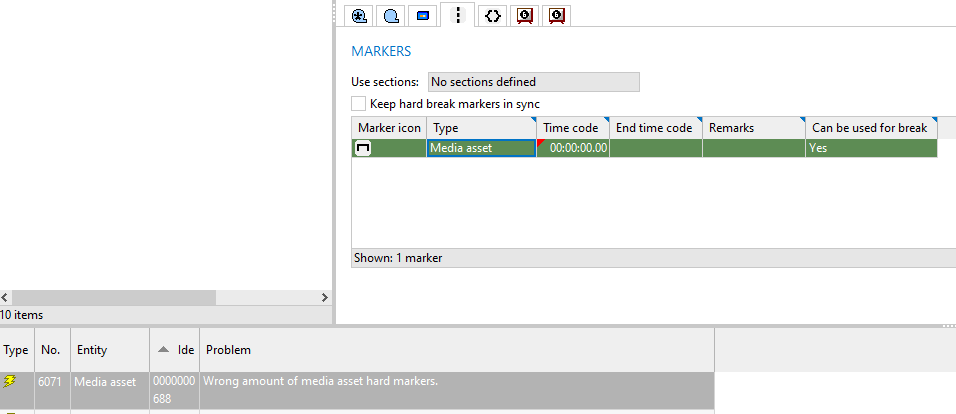
On the Markers tab of a media asset in WHATS'ON Base, it is possible to select the Keep hard break markers in sync check box. When this is selected and the TC in and TC out of a media asset are entered, markers with the Media asset type are automatically created. Their time codes will be read-only as they are synced from the TC in and out. It is not possible to create markers with this type manually.
When the check box is cleared, media asset markers would not be created when entering the TC in and out and they could also not be created manually.
Previously, however, using integrations such as the MAM API, it was possible to create media asset markers when the Keep hard break markers in sync check box was not selected. It was also possible to have only one media asset marker.
From this version, because of the introduction of the Hive video assistant, a constraint was added to prevent these inconsistencies.
When the Keep hard break markers in sync check box is
-
selected, it is checked that there are two media asset markers.
-
cleared, it is checked that there are no media asset markers.
If not, problem 6071 is shown and you cannot save until the situation is resolved.
The same will happen in the MAM API when a PUT or POST /mediaAssets call is sent that does not match the conditions above, such as one with only one media asset marker.
In this case, the following error is returned:
{
    "statusCode": "422",
    "message": "Operation cannot be completed due to violations",
    "timestamp": "2024-04-09T15:24:09Z",
    "concept": "MediaAsset",
    "id": "3405437000",
    "errors": [
        {
            "errorCode": "6071",
            "description": "Wrong amount of media asset hard markers.",
            "data": []
        }
    ]
}
Fix for unlinking media in /completeMediaAssets call of MAM API
Previously, when
-
using the
POST /completeMediaAssetscall to create a media asset with components linked to media; and -
using the
PUTorPOST /completeMediaAssetscall to update the same media asset to be linked to new components and media,
the new components were linked correctly to the new media but the old media remained linked to the media asset. When the same action is done in WHATS'ON, meaning a different media is linked to the components, either the old media is unlinked from all components and the media asset or only the specific component.
This issue has been fixed. If all components are linked to different media using the API, the old media is also unlinked from the media asset.
2023r6
Fix for deliveredDate for search call in YAML of MAM API
In a previous version, the delivered date was added to several calls in the MAM API. (See version 2023r4)
However, for the GET call to search for media assets, the attribute had not been added to the YAML of the MAM API as filter parameter.
This issue has been fixed. The deliveredDate has been added to the YAML for this call and can also be seen in the Explorer.
2023r4
MAM systems as parameters in search calls of MAM API
On video, subtitling and audio components, it is possible to define the MAM systems associated with those components.
Previously, it was not possible to search for components or media assets with a certain MAM system using the MAM API.
From this version, the mamSystems attribute has been added as search parameter to the following calls:
-
GET /videoComponents -
GET /subtitlingComponents -
GET /audioComponents
In the GET /mediaAssets call, a parameter has been added for each component type: videoMamSystems, audioMamSystems, subtitlingMamSystems
The API reference of the MAM system values should be used in the URL. The GET /mamSystems call can be used to retrieve the drop-down values of the MM2MamSystem drop-down list.
The URL of the search calls could then be defined as follows:
-
GET /mediaAssets?filter=eq(videoMamSystems,Dalet) -
GET /videoComponents?filter=eq(mamSystems,DAM)
2022r10
Extra custom attribute types in content, MAM and trailer API
Previously, the content, MAM and trailer API already supported the following custom attribute types:
-
Boolean
-
Date
-
Drop-down
-
Integer
-
Reference
-
String
-
Text
-
Web
From this version, the following types have been added:
-
Duration:
With default format HH:MM:SS:iii
-
Decimal number:
A period should be used as decimal and maximum two digits after the decimal will be returned.
-
Drop-down list for multiselection
They have been added to the calls that already supported custom attributes. A new version of the YAMLs can be retrieved to use these attributes.
In the GET calls, the following suffixes can be added to the call to either get only specified attributes in the response or all custom attributes of the supported types:
-
?customAttributes=attributeName,attributeName -
?customAttributes=allCustomAttributes
For each custom attribute, the attribute name, value and type will be given. The new types will be included in the response as follows:
    "customAttributes": [
        {
            "attributeName": "customMultiMA",
            "value": [
                "Value1",
                "Value2"
            ],
            "type": "Drop-down list for multiselection"
        },
        {
            "attributeName": "cADecimal",
            "value": 2.64,
            "type": "Decimal number field"
        },
        {
            "attributeName": "cADuration",
            "value": "02:03:04.000",
            "type": "Duration field"
        }
    ]
In POST or PUT calls, an array of custom attributes needs to be provided with their attribute name and value. If the value is left empty by using null or "" for some types, the custom attribute is emptied. The new types should be specified as follows:
    "customAttributes": {
        "cADecimal": 1.23,
        "cADuration": "01:32:20.000",
        "customMultiMA": ["TestWOnDynamicDomain23"]
    }
2022r8
Fix for updating media segments with incorrect segment numbers in MAM API
Previously, when sending a POST or PUT /completeMediaAssets call with a segmentation profile that included incorrect segment numbers (for example, one with number 0), the BAPI service would crash.
This issue has been fixed. When sending a call like this, the segment numbers will automatically be corrected. An upgrade script will also correct any existing incorrect segment numbers.
Fix for historical components in GET /mediaAssets call of MAM API
Previously, when using the GET /mediaAssets call of the MAM API and the full parameter was added to the call, for example GET mam/v1/mediaAssets/1542929000?full=true, then historical components were also returned in the response body.
This issue has been fixed. Only active components are returned.
2022r7
Delivered date in MAM API
A Delivered date field has been added to media assets, which can be used for exploitation right dates. (RN-5064)
It has also been added as an optional attribute in the following calls of the MAM API:
-
POSTandPUT /completeMediaAssetscall
-
POST,PUT,GETand search (GET)/mediaAssetscall
For example:
POST http://localhost:3000/mam/v1/mediaAssets
{
  "contentId": "142253527",
  "frameRate": "25fps",
  "label": "20000000",
  "mediaAssetId": "BAPI",
  "readyForAirDate": "2022-06-30",
  "deliveredDate": "2022-08-01"
}
Reactivate historical media assets with POST /mediaAssets call in MAM API
When a media asset is deleted, it becomes a historical media asset which cannot be used anymore.
Previously, when sending a POST /mediaAssets call using the MAM API and the call contained the mediaAssetId and mediaAssetSequenceId of a historical media asset and sequence, the following error response was returned:
{
    "statusCode": "422",
    "message": "Operation cannot be completed due to violations",
    "timestamp": "2021-08-31T14:31:19Z",
    "concept": "MediaAsset",
    "id": "334455",
    "errors": [
        {
            "errorCode": "MAM-00037",
            "description": "$_Media Asset sequence with id 23456 is not unique",
            "data": [
                "23456"
            ]
        }
    ]
}
This was because the ID was already taken by the historical sequence so it technically already existed.
From this version, in this scenario, the system will try to reactivate the media asset sequence based on the following conditions:
-
The sequence ID is historical;
-
The sequence contains only one media asset;
-
That media asset has the same ID as requested in the POST call
Afterwards, the media asset can be updated again.
Fix for multiple preferred media assets with POST /mediaAssets call of MAM API
Previously, when
-
creating a media asset through the
POST /mediaAssetscall of the MAM API with the attribute"preferred": true; -
and then creating a second one with the attribute
"preferred": truefor the same product; -
then both media assets would become preferred in WHATS'ON while that is not allowed.
This issue has been fixed. Now, only the last created media asset will be preferred and the indication is cleared from the other assets.
Fix for deleting linked segmentation profiles in POST /completeMediaAssets call of MAM API
Previously, when
-
a media asset contained segmentation profiles A and B; and
-
profile A was linked to a transmission in the past or future; and
-
a
POST /completeMediaAssetscall was sent with only profile B in the body,
then the service would crash. This was because, whenever a call contains an array of objects, and one of the existing objects was not part of the call, it would be deleted. In this scenario, segmentation profile A was linked to a transmission and could therefore not be deleted but the service could not handle this.
This issue has been fixed. In this scenario, when the transmission is
-
in the future, the segmentation profile will be removed since the same is possible in WHATS'ON.
-
in the past, the following error message will now be returned:
{
    "statusCode": "422",
    "message": "Operation cannot be completed due to violations",
    "timestamp": "2022-11-17T13:22:47Z",
    "concept": "MediaAsset",
    "id": "3938476000",
    "errors": [
        {
            "errorCode": "MAM-00038",
            "description": "$_Segmentation Profile can not be removed because it is linked in the past.
                           To remove it, the sequence should be removed",
            "data": []
        }
    ]
}
Fix for clearing parental ratings in PUT and POST calls of content and MAM API
Parental ratings on content and media assets are defined per regulator. This means they are represented as an array in API calls:
    "ratings": [
        {
            "regulator": "localRegulator",
            "rating": "12",
            "reason": null
        },
        {
            "regulator": "Ofcom",
            "rating": "allAges",
            "reason": null
        }
    ]
Previously, when trying to clear the ratings while updating a product or media asset by leaving the "rating": null in the PUT or POST calls of the APIs, an error message would appear saying the rating was invalid.
This issue has been fixed. When specifying null as value for the rating attributes, then the specific rating will be cleared. When sending null for the ratings array, all ratings per regulator will be deleted.
2022r4
Intention in GET /mediaAssetSequence call of MAM API
In a previous version, the intention was added to the PUT and POST call of a media asset sequence (2019r3.004).
Now it has been added to response of the GET /mediaAssetSequences/{mediaAssetSequenceId} call of the MAM API.
2022r2
Fix for random order of markers in GET media assets call of MAM API
When using the GET mediaAssets call of the MAM API to retrieve the details of a single media asset, the markers are also returned in the response.
Previously, when the media asset had multiple markers, they would be returned in the response in a random order each time the call was executed.
From this version, the markers will be returned in the order they have in WHATS'ON, meaning sorted on ascending time codes.
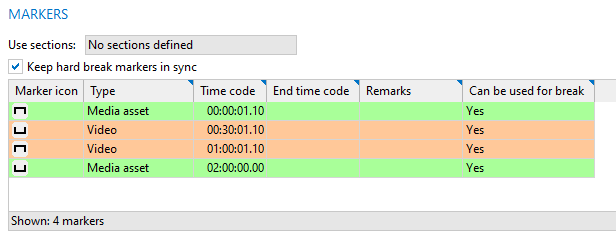
{
    "mediaAssetId": "3350420000",
    "mediaAssetSequenceId": "3350421000",
    "label": "0000000633",
    "mediaAssetLabel": "0000000633",
    "frameRate": "25fps",
    "status": null,
    "preferred": false,
    "intention": null,
    "kind": "ANTENNE",
    "TCIN": "00:00:01.10",
    "TCOUT": "02:00:00.00",
    "markers": [
        {
            "type": "hardBreakFromMediaAsset",
            "timeCode": "00:00:01.10",
            "endTimeCode": null,
            "remarks": null,
            "canBeUsedForBreak": true
        },
        {
            "type": "video",
            "timeCode": "00:30:01.10",
            "endTimeCode": null,
            "remarks": null,
            "canBeUsedForBreak": true
        },
        {
            "type": "video",
            "timeCode": "01:00:01.10",
            "endTimeCode": null,
            "remarks": null,
            "canBeUsedForBreak": true
        },
        {
            "type": "hardBreakFromMediaAsset",
            "timeCode": "02:00:00.00",
            "endTimeCode": null,
            "remarks": null,
            "canBeUsedForBreak": true
        }
    ],
    "sourceMediaAssetId": null,
    "contentId": "3261522527",
    ...
    ]
}
Fix for sorting on status in GET contents call in MAM API
In the MAM API, the GET /contents call can be used to search for media assets of a certain content item. It is possible to sort the results on several attributes including the product status.
Previously, when sending a GET /contents call with the &sort=status sort parameter, the system would crash for every call.
This issue has been fixed and now the list of media assets will be sorted correctly on the status.
2022r1
Ready for air date as search criterion for media assets in MAM API
In the MAM API, it is possible to search for media assets using the GET /mediaAssets call. A number of search criteria can be added to the query parameters of the call.
For example: /mediaAssets?filter=eq(status,Ready for broadcast)
From this version, it is possible to search for media assets based on the Ready for air date property. The date used in the query should always have the format YYYY-MM-DD. All existing search operators can be used with the criterion.
For example: /mediaAssets?filter=gt(readyForAirDate,2020-01-01)
This searches for media assets with a Ready for air date that is greater than 01/01/2020.
2021r3.000
Custom attributes in MAM API
As from this version, support has been added for the following custom attributes types in the MAM API:
-
String
-
Boolean
-
Dropdown
-
Integer
-
Date
-
Text
-
Web
-
Reference
This support has been added for the concepts Media Asset, Media, Video component, Audio component and Subtitling component.
2021r2.001
API version: v1.4.1
Fixes
Preferred and Kind interaction
Previously, when using the POST and PUT media asset and complete media asset calls in the MAM API, it was possible to have behaviour that was not allowed in WHATS'ON.
If a value for the attribute kind was sent which cannot be broadcast (as set in drop-down list MM2MediaAssetKind), and the preferred attribute was set to true, the media asset would be created. It would be marked as preferred, but field Kind would be left empty, even though the value passed and was shown in the service. This is because in WHATS'ON, the media asset cannot be preferred and have a kind that is not suitable for broadcasting. If you try this in WHATS'ON, a message is shown.
This issue has now been fixed. The commercial is not created and the following response is returned:
{
    "statusCode": "422",
    "message": "Operation cannot be completed due to violations",
    "timestamp": "2021-06-30T10:47:13Z",
    "concept": "Commercial",
    "id": "be04be9e-9e34-4c4e-9397-1e57cff646f2",
    "errors": [
        {
            "errorCode": "CORE-00002",
            "description": "The kind of media asset cannot be used for broadcasting
			     so you cannot set it as preferred",
            "data": [
                "NOT FOR AIR"
            ]
        }
    ]
}
This has also been fixed in the commercial API.
Segment identification
It is possible to update media assets with new segments in their segmentation profiles using several calls in the MAM API. Previously, if there were at least 2 media segments in the profile with the same value for the segmentIdentication attribute, it would only update a segment with that value instead of creating all the segments.
This issue has been fixed, so all segments included in the call are created with the provided segmentIdentication.
2021r2.000
Fix for empty components when creating media assets with templates in MAM and commercial API
The MAM API has a POST /mediaAssets call to create media assets using templates, which are prototypes in WHATS'ON. The commercial integration API has a POST /commercial call that you can use to create commercials and its media assets. For those media assets, you can also specify a template.
Previously, when the defined template also contained component prototype sets to automatically create components, only the media asset but not the components were created when sending the call.
This issue has now been fixed and the components are created correctly.
2020r2.000
API version: v1.2.0
Additional media fields
It was already possible to include some properties of the media, such as media label, status, library and type, when using the calls for components. From this version, more media fields have been added to the POST, PUT and GET calls for video, subtitling and audio components:
- Network path
- TC in
- TC out
- Remarks
- MAM media ID
- Checksum
- File size
- File format
- Encoding
- Extension
There are also 3 new GET calls to retrieve the values of the drop-down lists used by the fields File format, Extensions and Encoding. See the calls in the API Explorer.
2020r2.002
Improvements to MAM API
A new POST and PUT call is created, that allows creating or updating a media asset and all its components in one call. Furthermore, the GET /mediaAssets/{mediaAssetId} call is adjusted to support the complete media assets call.
2020r1.002
API version: v1.2.1
External reference cannot be cleared by BAPI
Within any POST and PUT call, if a an attribute is sent empty, WHATS'ON will clear that field. Previously, this was also possible with the external reference of all media-related objects.
Now, this is fixed. When no external reference is provided but the attribute is sent empty or null, we will ignore that tag and proceed as if there was no ID field (external reference) provided. This means that it should remain as is in a PUT call or return a new one in a POST call.
2019r3.004
API version: v1.2.1
Consistent error message for identical IDs
External references in WHATS'ON are generated in a unique way but they can be edited afterwards, resulting in identical IDs for multiple objects. Previously, when updating a media asset using an ID that was used for multiple objects, an error was returned:
{
    "statusCode": "422",
    "message": null,
    "details": {
        "message": {
            "id": "MAM-00001",
            "description": "$_Multiple Media Assets found with id 3117372000",
            "parameters": [
                "3117372000"
            ]
        },
        "concept": "MediaAsset"
    }
}
This issue can also occur for the other objects in the MAM API but this error message was not implemented for those.
Now, it is returned for all objects: media assets, media asset sequences, audio components, video components, subtitling components, segmentation profiles.
Updating media asset sequences linked to transmissions
Previously, when a media asset sequence was linked to a past transmission, it was not possible to update this sequence using the media asset sequence calls. In that case, the following error message was returned:
{
    "statusCode": "422",
    "message": null,
    "details": {
        "message": {
            "id": "MAM-00027",
            "description": "Media assets with ID''s 3117389000 are linked
                            to one or more transmissions in the past",
            "parameters": [
                "3117388000"
            ]
        },
        "concept": "MediaAsset"
    }
}
However, this constraint was not present in WHATS'ON. You could alter media asset sequences at any moment is time. Therefore, the constraint is removed from the BAPI.
Updating intention on media assets of sequence
Previously, when a media asset was part of a sequence with multiple media assets, and the intention was updated on that media asset, a check was done to see if the intention was the same on all media assets of the sequence. If it is not, an error message was returned:
{
    "statusCode": "422",
    "message": "Operation cannot be completed due to violations",
    "details": {
        "message": {
            "id": "CORE-00002",
            "description": "$_Operation cannot be completed due to violations",
            "parameters": []
        },
        "violations": [
            {
                "messageNumber": "2462",
                "description": "All media assets belonging to a media asset sequence must have the same kind and intention."
            }
        ],
        "concept": "MediaAsset"
    }
}
It was then not possible to update the intention of all media assets using the BAPI since this field was not available in the media asset sequence call.
Now, the intention can be added as an optional field in the PUT or POST call of a media asset sequence. When it is used, the intention is updated to this value in all media assets of the sequence.
{
    "mediaAssetSequenceId": "3117389000",
    "intention": "ANTENNE",
    "mediaAssets": [
        "3117388000"
    ],
    "segmentationProfiles": []
}
Additionally, when the error message on a specific media asset is returned, more information is included to guide users to the media asset sequences call.
{
    "statusCode": "422",
    "message": "Operation cannot be completed due to violations",
    "details": {
        "message": {
            "id": "CORE-00002",
            "description": "$_Operation cannot be completed due to violations",
            "parameters": []
        },
        "violations": [
            {
                "messageNumber": "2462",
                "description": "Intention should be the same for all media assets of a media asset sequence.
                                To update the intention of all media assets in a media asset sequence use the media asset sequence calls."
            }
        ],
        "concept": "MediaAsset"
    }
}
2019r3.002
The Media asset management business API now also supports creating, updating and deleting media asset sequences.